Full time study
College Further Education Bursary and Education Maintenance Allowance (EMA)
This funding is available for students studying at Further Education level (up to but not including HNC). A bursary is a financial award given to a Further Education student at the discretion of the College to help maintain them in their education at College. An award can include allowances that cover a student’s maintenance, travel and study costs.
An EMA provides maintenance support for students from low income households who undertake a Further Education course at College.
Normally, Further Education students aged under 18 on the start date of their course will be eligible to apply for EMA rather than Bursary maintenance costs. Further Education students both under and over 18 on the start date of their course may be eligible to apply for Bursary travel and study costs. If you are a Scottish resident studying a full time Further Education course, you will have no tuition fees to pay.
You will be able to apply online from mid-June onwards prior to starting your course. For more details, please see the following guides.
Funding evidence guide
Funding evidence guide
Guide to EMA Bursary Funding
Guide to EMA Bursary Funding
You will find all the information you require in our Guide to Bursary and EMA Funding
Guide to accessing the Student Hub
Guide to accessing the Student Hub
Applying for your EMA, Further Education Bursary, Further and Higher Education Childcare and Discretionary Funding through UHI Records
Applications for any of the above can be made online through your UHI Records account which can be found through the college website or directly on the UHI Records website.
Your UHI Records account is your electronic view of the records the college holds about your studies and is one of the methods the College uses to communicate with you about various aspects of your college life.
In addition to applying for funding you can also use UHI Records to:
- enrol on your course
- contact your tutor
- keep you up to date with college life and lots more...
Funding
Financial assistance from the Education Maintenance Allowance (EMA), Further Education Bursary, Childcare and/or Discretionary Funds are only available through your account. This includes Higher Education discretionary and Higher Education Childcare and all correspondence about your entitlement is communicated through your account. Such as
- Who to contact and how
- Follow the progress of your application
- View what documents you need to submit
- Download forms that may be requested for your application
- View and print your award letters
- How your award is calculated
- Submit an Appeal and request a Re-assessment – this allows you to appeal the funding decision or inform staff of any changes to circumstances that may mean a re-assessment of circumstances.
Accessing your UHI Records Account
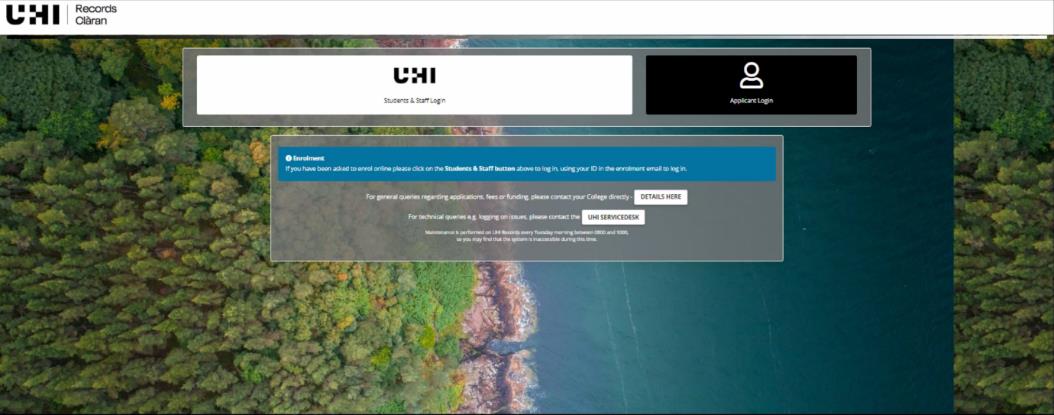
In your internet browser go to the following address www.studentjourney.uhi.ac.uk (You can also find a link to UHI Records on the student section of the UHI website). Click the Current Students & Staff Login button then login with your username and password which has been sent previously.
Always keep your password secret and do not share it with anyone. We will never ask you for your password.
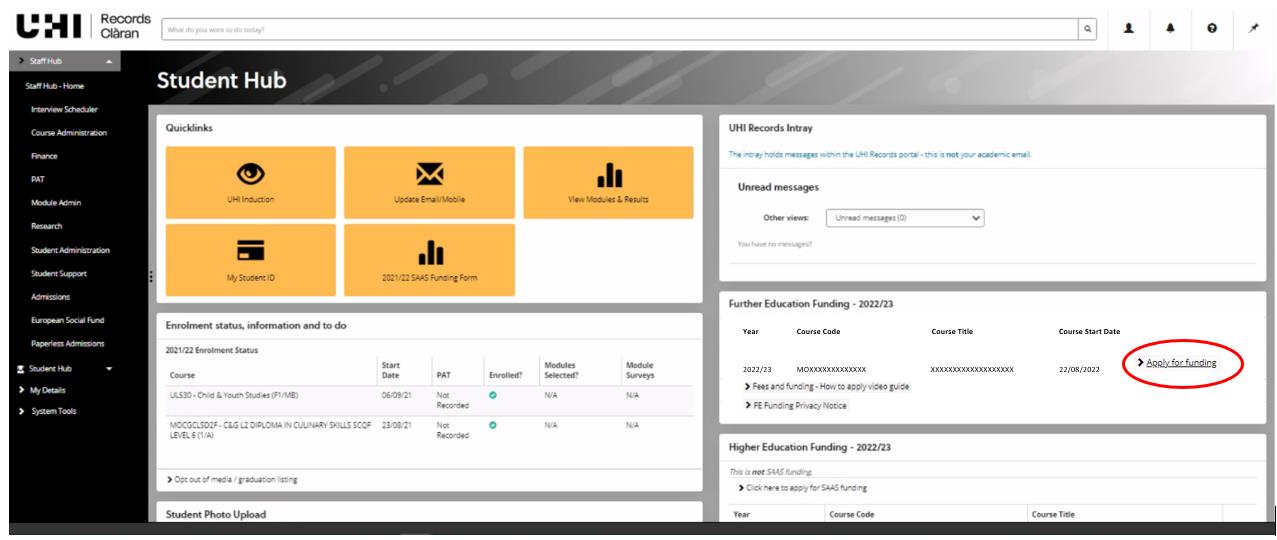
Applying for funding
To access your funding application, click on the “Apply for funding” Once you have submitted your application you can view its progress and other information relevant to you by clicking on the box entitled “funding” from the student hub dropdown (See below)
If you have any questions about completing your online funding application, please contact:
- UHI Argyll ACBursary@uhi.ac.uk
- UHI Inverness funding.ic@uhi.ac.uk
- UHI Moray Student.Services.moray@uhi.ac.uk
- UHI North, West and Hebrides funding.nwh@uhi.ac.uk
- UHI Perth StudentFunding.Perth@uhi.ac.uk
Using UHI Records in General
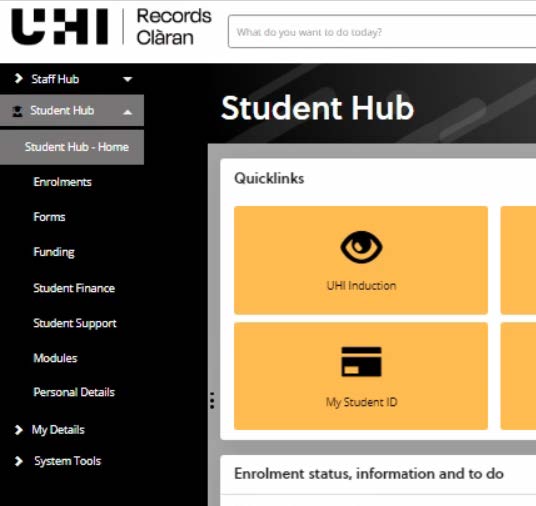
From the Student Hub dropdown at the left of the screen you can explore all the different areas of your account. You should familiarise yourself with these areas for information on what is available to you.
Modules
This allows you to see:
- Completed module results
- Modules you are taking this year
- Resits or modules continuing from a previous year
Personal Details
Students can check and change their address or contact details at any stage as well as change data sharing consent options. Care Experience (whether you have been in care) can also be updated as appropriate. For changing next of kin details students need to contact the local registry team to update this information. Your next of kin would be contacted by your college should there be any emergencies, so it is important that you let your college know of any changes.
Forms
On this screen you can:
- Print out a dyslexia sticker (only available to students who have contacted their local disability co-ordinator in the first instance).
- Apply for mitigating circumstances for exams/assessments (HE Students only) Along with other options regarding your study options.
Student Support
For students with disclosed disabilities or additional support needs we can arrange assistance and advice to help you get the most of your time out of university/college. If you have any queries, please contact your local support team in the first instance.
Guide to uploading documents to your Student Funding Application
Guide to uploading documents to your Student Funding Application
When you submit your online funding application you will be asked to provide documents to confirm the information you have entered on your funding application. You will see them immediately after you submit the application, and you can view them each time you login to your Hub account.
Your application will not be looked at by any staff or considered for processing unless you have uploaded a document for each evidence request.
You can submit your documents by scanning or taking a photo of them on your phone and uploading them direct into your application. You can do this at any time while your application is active.
You must ensure the photo or scan is clear and shows dates, names etc. Screenshots on your phone will not be acceptable if this information is not shown. We also require all pages of the document.
How to upload your documents
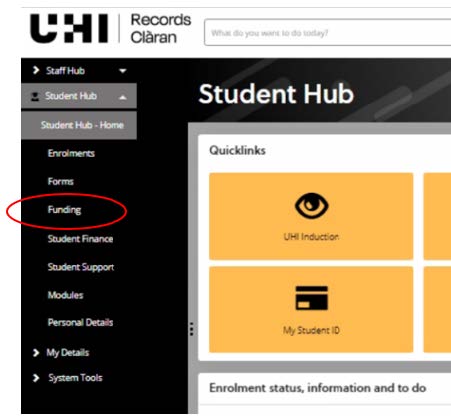
To upload the documents yourself, when you have logged into your UHI Records account, click on the Student Hub at the left of the screen and select Funding from the drop down.
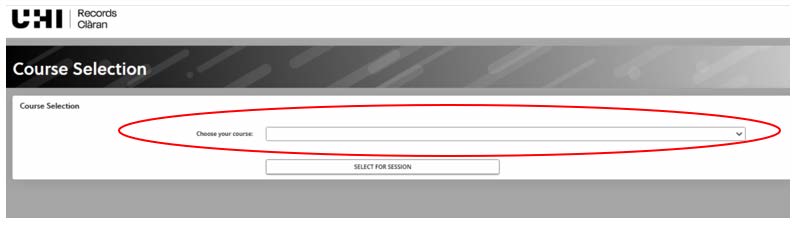
You may get a screen which asks you to select the course for which you want to apply for funding. Your course should appear when you click on the drop-down button at the right of the field.
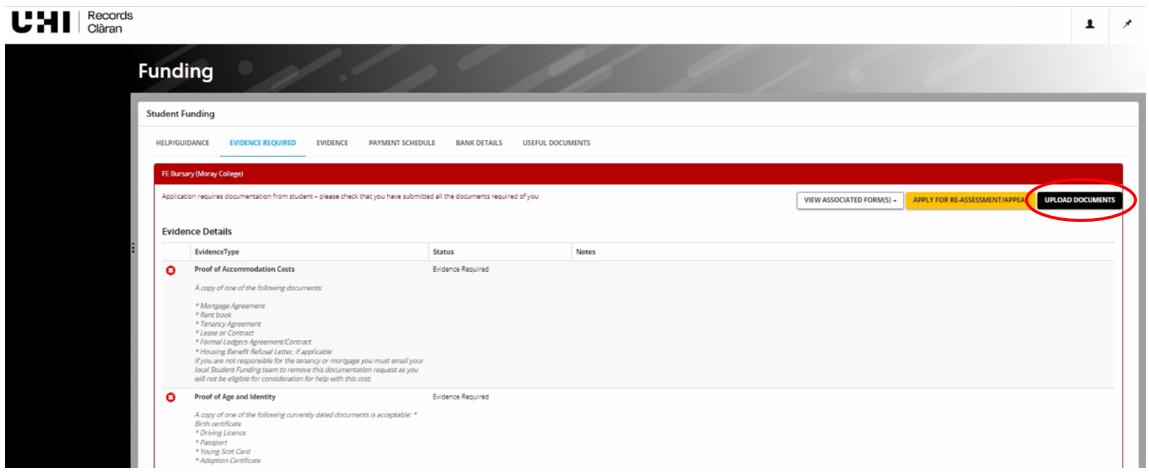
This will take you to “Funding” Section of your UHI Records account and click on the “Evidence” tab (circled on the screenshot below) to see which documentary evidence you need to submit.
This will take you to a screen, which shows you the documents we require. Click on Upload Documents
This will take you to the upload page, please read what document formats are acceptable for documents requested, as multiple screenshots, screenshots without details such as names, addresses, account numbers and dates etc. will not be acceptable.
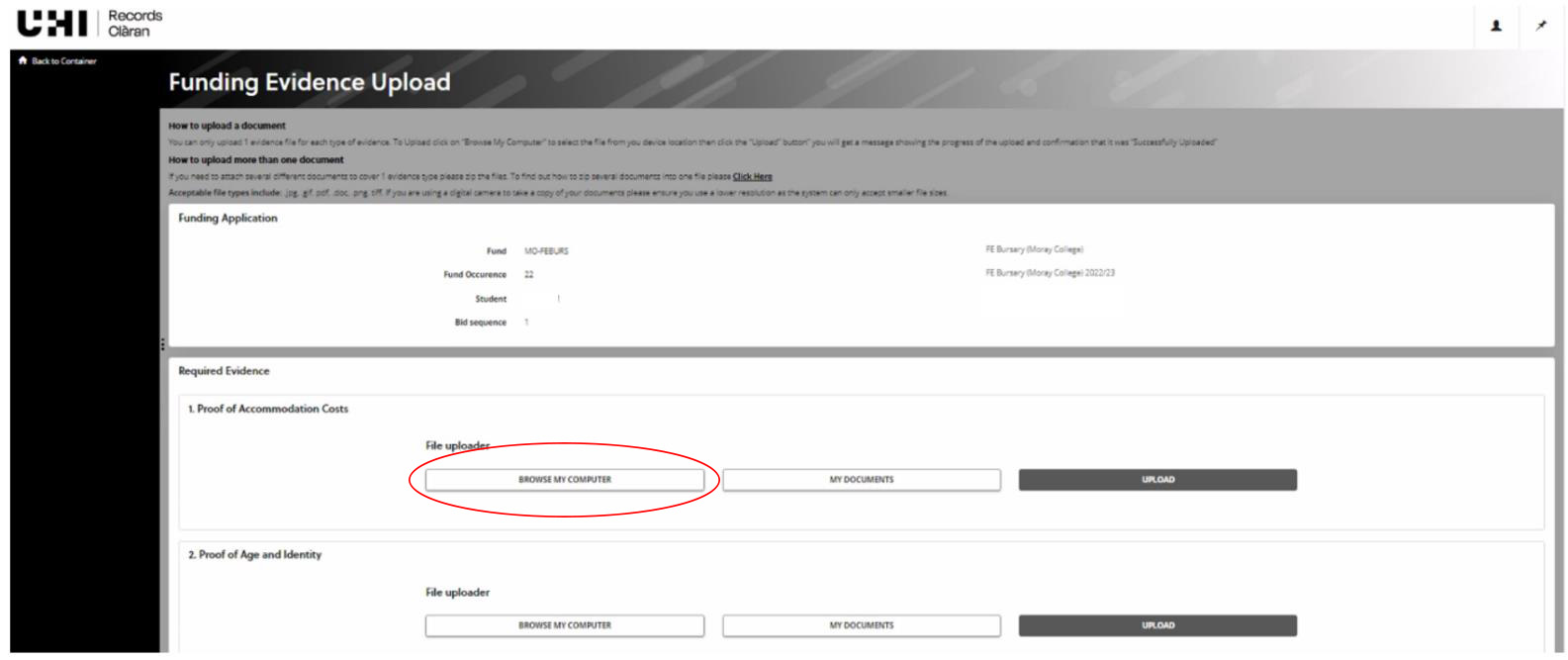
Then upload each document for each evidence request by clicking on "Browse My Computer"
When you click on this button, your device will open its browser to allow you to go to the location where you have chosen to store the document. We recommend that you name your documents something obvious which relates to the document request to ensure you upload the correct document to the request. Click on it and either click “Open” or double click on it. This will take you back to the file uploader screen and show File Status as “Awaiting Upload”.
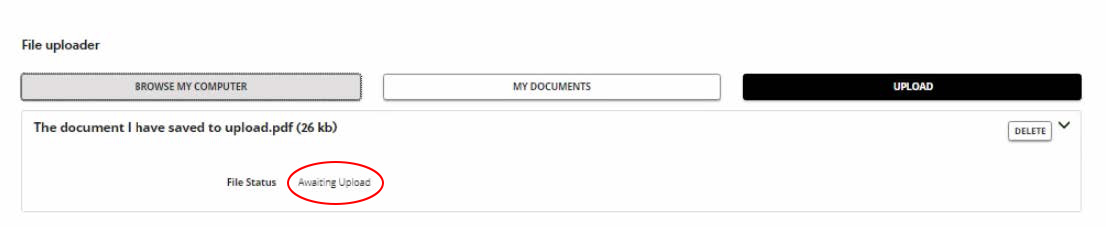
Check you have attached the correct document to the correct evidence request. Then click UPLOAD.
Once complete, the evidence record will show that the document has been submitted.

When you have submitted a document for each evidence request, your application status will move to “Pending” on our system and will then be considered for funding by the Student Funding team.
If you have any questions, please contact your local funding or student support team:
UHI Argyll ACBursary@uhi.ac.uk
UHI Inverness funding.ic@uhi.ac.uk
UHI North, West and Hebrides funding.nwh@uhi.ac.uk
UHI Moray Student.Finance.moray@uhi.ac.uk
UHI Perth StudentFunding.Perth@uhi.ac.uk
Student Awards Agency for Scotland (SAAS) and Student Loan funding
This funding is available for students studying at full time Higher Education level (HNC and above). The funding available can include Tuition Fee Support, Student Bursary, Student Loan, Lone Parent Grant and Disabled Students Allowance.
More information about the funding available can be found at the SAAS website.
The SAAS funding guide is also available.
You will be able to apply online to SAAS for your funding from early April onwards prior to starting your course. More information on how to apply.
Students resident in the rest of the UK (RUK) are generally not eligible to apply to SAAS for funding and instead have to apply to either:
- Student Finance England
- Student Finance Wales or
- Student Finance Northern Ireland, depending on where you live.
You should also note in this case that there is a higher level of tuition fee for RUK students. More details on the fee information page.